Business Email Marketing

Crafting Great Email Signatures for Your Business

Whether you’re using Google’s GMail, Microsoft’s Outlook.com for Business, or another business email service, one of the most overlooked yet important elements of your email is the email signature. Take note of the following tips to make sure your email signature leaves the best first impression with your customers and clients. Use Graphics Sparingly The email signature is sometimes the most reassuring thing a customer sees when they read your email. Email signatures with graphics tend to be more professional-looking and therefore more reassuring, but you also need to make sure you’re using the right amount of graphics to make

Continue readingCrafting Great Email Signatures for Your Business

Small Business Website Design, Better than Wix

Getting Your Small Business Website Professionally Designed

Small business website design is important but difficult, and let’s face it, starting your own small business can be stressful enough (though, of course, but it can also be rewarding). One of the biggest stresses that seem to pop up, particularly in E-Commerce websites during the early design phase, is actually how to go about getting a website built in the first place, since most successful businesses today have their own websites. It’s true, there are various do it yourself (DIY) website builders that you can utilize yourself, but many fall short of providing the intuitive services that your small

Continue readingGetting Your Small Business Website Professionally Designed

Woocommerce platform

Change “Default Sorting” Dropdown Option to “Sort By Relevance” in WooCommerce

Default sorting is not exactly user-friendly for customers visiting your e-commerce store. For most customers, “Sort by Relevance” is easier to understand, and comes across as “more welcoming” to visitors, particularly those who don’t shop online often. Ideally, you want your dropdown to default to something like the screenshot shown below of one of my clients’ websites. /** * Changing “Default Sorting” to “Sort by Relevance” on Shop and Product Category pages **/ function sip_update_sorting_name( $catalog_orderby ) { $catalog_orderby = str_replace(“Default sorting”, “Sort by Relevance”, $catalog_orderby); return $catalog_orderby; } add_filter( ‘woocommerce_catalog_orderby’, ‘sip_update_sorting_name’ ); add_filter( ‘woocommerce_default_catalog_orderby_options’, ‘sip_update_sorting_name’ ); If you prefer,

Continue readingChange “Default Sorting” Dropdown Option to “Sort By Relevance” in WooCommerce

https website security

Automatically Redirect HTTP Website Traffic to HTTPS via .htaccess File

You will, of course, need an SSL website security certificate, but once you have one, you’ll want to configure your server so that your visitors and clients are automatically. You can see how this works by typing https://joshrobertnay.com (http not https) in the address bar of your browser and this site will redirect you to the secure https URL. Not only does this serve to make your website more secure, but it also helps improve your site’s SEO. Finding .htaccess file in cPanel This redirect is relatively simple to implement if you’re familiar with the layout of cPanel. You’ll need

Continue readingAutomatically Redirect HTTP Website Traffic to HTTPS via .htaccess File

Search Online Marketing SEO

Search Engine Optimization (SEO) Frequently Asked Questions

People who are just getting started online tend to have more questions, but even those of us who are experienced might find ourselves pondering about why things are done the way they are, and how we might do things differently with each individual website. Listed below are some of the most common questions asked regarding SEO and marketing via search engines. We try to keep these answers short and simple. If you have a question, please send it here and it’ll be added below. What is SEO? SEO is an acronym for Search Engine Optimization. In a nutshell, it’s a

Continue readingSearch Engine Optimization (SEO) Frequently Asked Questions

Web and graphic design service

Making the Web Faster: Upcoming Google Search Update Will Target Slow Mobile Sites

If you’re hoping to get your mobile website in front of more eyeballs in Google Search, you’d better start with increasing your website’s speed, and you should do it before July 2018. A recent announcement by the search giant revealed the lengths it’s going to integrate site speed into its latest search algorithm change coming this summer. According to Google: The “Speed Update,” as we’re calling it, will only affect pages that deliver the slowest experience to users and will only affect a small percentage of queries. It applies the same standard to all pages, regardless of the technology used

Continue readingMaking the Web Faster: Upcoming Google Search Update Will Target Slow Mobile Sites

Bing and Google SEO

Does Google Search PageRank Still Matter?

PageRank, that is, Google’s first — but not only — algorithm for ranking content in search results, is well-known throughout the ranks of web designers and SEO experts everywhere. It was established during the early days of the Google search engine and continues to play a part to this day. However, the part it plays has steadily become less important over the last few years. Since at least 2009, PageRank has steadily been deprecated from public view as the end-all, be-all important way to rank websites. In that year, Google decided to remove the metric from its Google Webmaster Tools

Continue readingDoes Google Search PageRank Still Matter?

Bing and Google SEO

SEO is NOT Dead… Far, Far From It

I recently read a post on social media from a person who (while remaining nameless) was supposed to be an expert in his field. This post, however, got under my skin because he essentially called SEO (Search Engine Optimization) a fruitless endeavor, saying it was “dead” and calling on companies to make their investments elsewhere. I truly hope this person is not an advisor for companies in his spare time. Here’s the truth. SEO is not dead. Backlinks? Yes, it’s true that backlinks are now one of the least important parts of SEO nowadays. While still somewhat relevant, they’ve taken a

Continue readingSEO is NOT Dead… Far, Far From It

Minimum price WooCommerce

Show “Starting At” Price and Hide Maximum Price in WooCommerce

This is a relatively simple code, but it does require modifying the functions.php file in your child theme, which is not recommended unless you are familiar with how to edit a functions.php file in WordPress. This code will allow you to display the minimum price with a “Starting at” prior to it rather than a price range (which, let’s admit, can be a turn-off to some price-conscious customers). You can see a demonstration of how this works in the screenshot above. This is a screenshot of it in action on my client HEALTHandMED‘s website. Note, you can change “Starting at”

Continue readingShow “Starting At” Price and Hide Maximum Price in WooCommerce

WordPress Dashboard Editing

Add Custom Widgets to the WordPress Dashboard

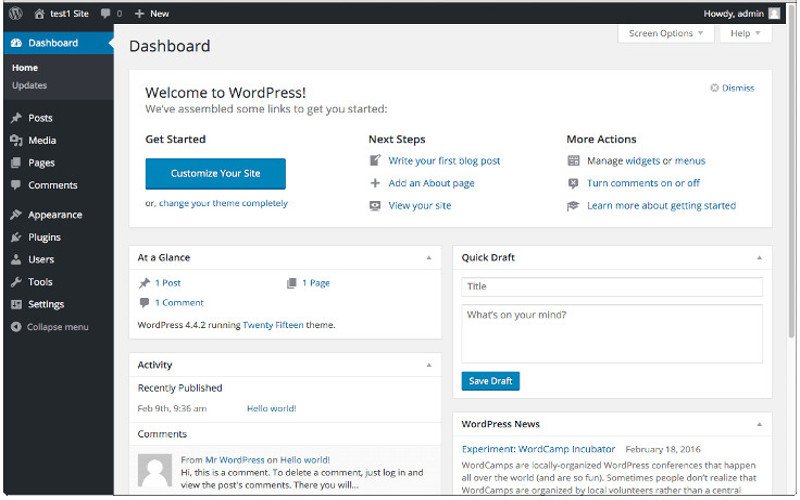
Adding widgets to your dashboard can increase the functionality of any WordPress installation. Whether you’re doing it for yourself or your clients, it can go a long way toward creating an experience that’s fully customized, spotlighting the functions you use the most. To get started simply add the following code to your WordPress child theme’s functions.php file: function add_custom_dashboard_widgets() { wp_add_dashboard_widget( ‘wpexplorer_dashboard_widget’, // Widget slug. ‘My Custom Dashboard Widget’, // Title. ‘custom_dashboard_widget_content’ // Display function. ); } add_action( ‘wp_dashboard_setup’, ‘add_custom_dashboard_widgets’ ); /** * Create the function to output the contents of your Dashboard Widget. */ function custom_dashboard_widget_content() { // Display

Continue readingAdd Custom Widgets to the WordPress Dashboard